"Macro better" is the most common advice in Brood War, and the least useful. Better than what? By how much? At which minute? Repalyzer answers those questions by putting your game next to a benchmark, such as a progamer's average in the same matchup, and showing exactly where you fall behind.
Two tools do this. Adept races your game against a benchmark, minute by minute. The Skill shape sums up five skills on one picture, scored against progamers. Both need StarCraft installed, because they use the simulation.
Step 1: Get a pro replay pack
The Repalyzer page offers packs of recent 1v1 games from progamers in their main race, shared by the StarCraft community. There are 15 to choose from: five Zerg (herO, Jaedong, Soma, Soulkey, ZeLoT), five Terran (Leta, Light, Rush, Sharp, Speed) and five Protoss (Best, Bisu, Mini, Snow, Stork).
Pick a player of your race who plays your matchup a lot. Each pack lists its games per matchup. A matchup with fewer than 10 games is greyed out, which means comparisons there are rougher. For example, Soma's pack has 44 ZvZ games but only 13 ZvT.
Unzip the pack and import the folder in Local Explorer. Let background analysis run on it so the averages are ready.
Step 2: Turn on Adept
Open one of your own games in Repalyze and switch on Adept. Choose what to compare against:
- Your usual games in the matchup: are you playing better or worse than normal?
- Your best game: the one with the best production uptime (larva use for Zerg).
- Any replay in your library: for example, a game you lost to a friend.
- A known player's average: the progamer whose pack you just imported.
The Adept appears as a dashed line on the APM, Income and Workers & supply charts. Under them, a bar for each minute shows the gap: above the line you are ahead of the Adept, below it you are behind.
Step 3: Find the minute you fall behind
The most useful single fact in Adept is when you first fall behind. Repalyzer states it directly, for example: "You fell behind the Adept in income from 6:00."
That minute is where your training should start. Falling behind at 4:00 usually means a build order problem: late expansion, late gas, a missed worker. Falling behind at 9:00 usually means a multitasking problem: the first big fight or drop pulls your attention and your macro stops.
Key timings help here too. The build order tab shows when you reached each step (first gas, first expansion, first tech building) next to the Adept's timing.
Step 4: Read the Skill shape
The Skill shape is a pentagon with five corners, each scored from 0 to 10:
| Skill | What it measures |
|---|---|
| Micro | How fights went: damage dealt against taken, units killed against lost |
| Speed | Effective APM after the warm-up: actions without spam |
| Hotkeys | Hotkey actions (assign, add and recall) as a share of all actions; progamers reach about 55% |
| Idle workers | The share of worker time spent idle; fewer idle workers means a higher score |
| Macro | Production counts half; staying out of supply blocks and spending count a quarter each |
A 10 is the level of the best 10% of progamer games for your race in that matchup. A 0 is far below; for Idle workers, that is the level of the worst ladder games at D rank and below.
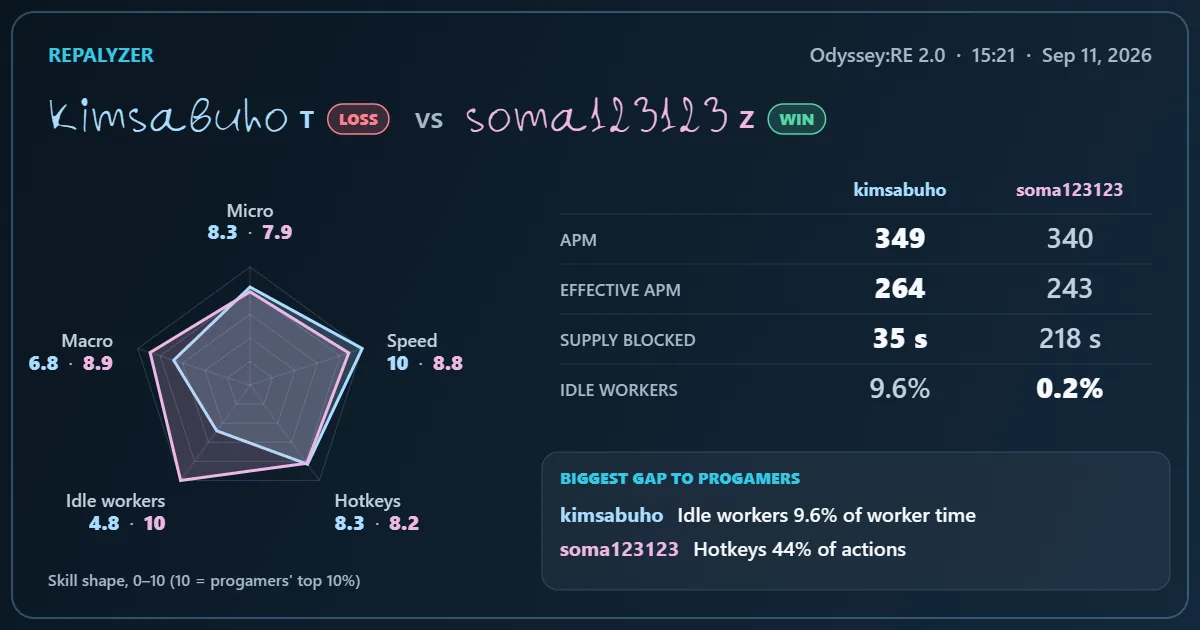
- 1Light's lowest corner: Idle workers, 4.8.
- 2Soma's Idle workers: 10, the widest gap between the two shapes.
- 3Speed: Light 10, Soma 8.8. Fast hands did not stop the workers going idle.
- 4Each player's biggest gap to progamers, in one line under the shape.
Don't aim for a perfect pentagon. Aim for a balanced one. A shape with 8 in Speed and 3 in Macro tells you that your hands are fast enough and your attention is the problem. Note that a bigger army wins fights too, so read Micro together with Macro: a high Micro score in a game where you were far ahead on supply says more about your macro than your control.
With Adept on, the pentagon shows your shape and the Adept's shape on top of each other, measured over the same minutes.
Try it: draw your own Skill shape
You don't need the app to get a first look at your shape. Pick your race and matchup, type in four numbers from a recent game, and the calculator draws your pentagon over Light's from Light vs Soma.
Micro needs fight data from the simulation, so that corner stays empty here. Analyze a replay in Repalyzer to fill it in.
The calculator uses the same 0–10 scale as the app, but it only sees the numbers you type. The app measures them minute by minute, adds Micro, and shows where in the game the gap opened.
Want the maths behind the calculator? Under the hood: the methodology behind Repalyzer publishes every floor and top it uses, and lets you drag a value along the scoring curve.
Step 5: Turn the gap into a number to beat
The landing page example shows how this works. In Light vs Soma, Light's biggest gap to progamers was idle workers: 9.6% of worker time, most of it between 8:00 and 9:00. The best 10% of progamer games sit at 2.4%.
That gives you a clear target. Not "have fewer idle workers", but "get idle workers under 5% in my next ten games, and watch the 8 to 9 minute mark". Automatic mode shows the number after every game, so you know at once whether you hit it.
Share it
The Game card puts the result, your Skill shape and key numbers on one picture (1200×630), ready to copy or save as a PNG. Keep one a month and you can watch your shape grow.
Then post it. Share your Game card on the Repalyzer Discord with one line on what you are working on, such as “idle workers, under 5% by the end of the month”. Every week I pick one card to feature: the biggest jump in a single corner, the most balanced shape, or the best story behind the numbers. Post your next card and the one before it side by side, and the progress shows itself.
Practice task
Import one pro pack for your race. Run Adept on your last five games in your main matchup against that player's average. Write down the minute you first fell behind in each game. If it is the same minute three times or more, that is the moment to fix.