A replay review is only worth something if it changes the next game. Repalyzer 1.0 told you what happened in a game. Version 1.1.0 is about what you do with it afterwards: remember it, find the pattern across many games, and take it into practice.
It is not a big update, but a meaningful one. You can now write notes on your games and tag them. Repalyzer tells you how predictable you are, and how predictable your next opponent is. Your builds go straight into sagi.gg for practice. And the simulation engine got a batch of fixes, so more replays analyze from start to finish.
This article walks through what is new, what got better, and how to use it to win more games.
1.1.0 at a glance
Jump to what interests you, or read on from the top.
Notes and tags
Your replays now remember what you learned
Replay data can show you exactly why you lost a game, and a week later the lesson is gone. Now each replay can hold notes of up to 20,000 characters: how you won, why you lost, the enemy's build, the timing you missed.
- The Your notes card sits at the top of the Overview, next to Game at a glance.
- In Local Explorer, games with notes carry a Notes badge. Hover it to read them.
- Search finds words in your notes. Search "reaver drop" and you get every game where you wrote about one.
Tags group games the way you think about them: "lost to proxy", "clan war", "good macro", "tournament prep". Tag one replay from More › Add tags, or select several and choose Tag selected. Your tags appear in the Local Explorer sidebar, and the Player dashboard can show only the games with one tag.
How predictable are you?
Good players exploit habits. If you open the same way in 9 of 10 ZvP games, a prepared opponent knows your build before the game starts.
The new How predictable are you? card on your own dashboard scores you from 0 to 100. It asks how well someone guessing your usual choices would predict your next game: the opening counts 60%, the follow-up 20% and the first tech building 20%. You get a label: Predictable, About average or Unpredictable.
Out of their last 10 games in a matchup, how many times did they play…
Predictable is not always bad. A solid build you execute well can carry you a long way. But you should know it, because your opponents can find out too.
Scouting an opponent
The Scouting card now works per matchup, with a switch between them. For each one it shows:
- how predictable they are in that matchup, for example "From 10 ZvP games: 6 against you, 4 against others";
- What stands out: up to three things they repeat, such as an opening that is unusual for the matchup, a tech building they go for in 8 or more of 10 games, or a recent change of opening;
- What worked for you against them in that matchup.
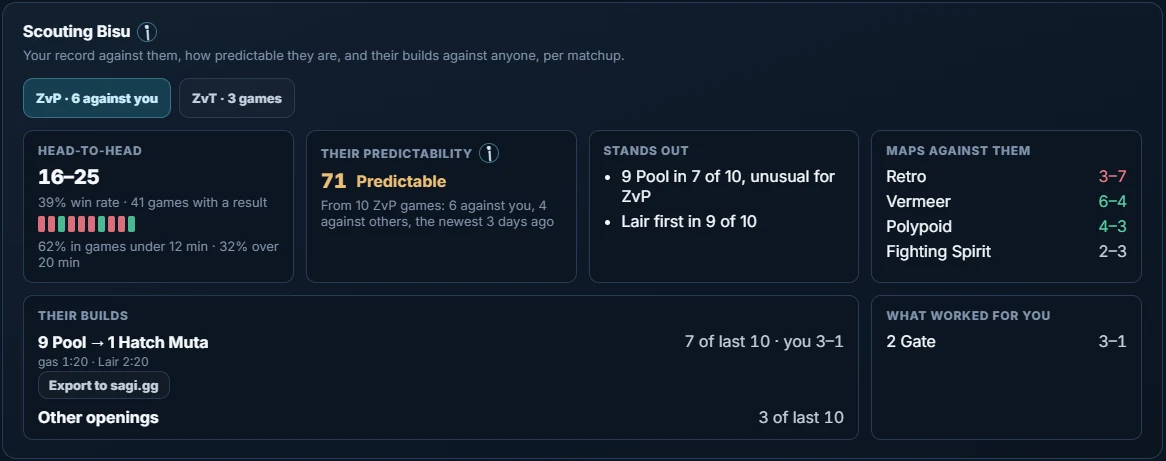
The Opponents list also has a Predictability column, so you can sort the players you meet by how readable they are. And on a single game's Overview, under Key timings, Repalyzer now notes when a player's usual opening stands out.
You do not have to go looking for the card either. The report after each game has a Scout button for your opponent, and the same button sits on your opponent's card when you open a game in Repalyzer.
Build orders for sagi.gg
Knowing a build is one thing. Executing it under pressure is another. sagi.gg has a new Build order feature that can help you practise builds, and Repalyzer now feeds it directly.
- 1Exporta build from any replay in Repalyzer
- 2Practiseit in the build order tool on sagi.gg
- 3Compareyour next games with the build, step by step
- Export to sagi.gg. On the Build order tab, pick a player and choose Export to sagi.gg. It copies their build up to 8:00, with research and upgrades. Paste it into the build order tool on sagi.gg and practise it.
- Export your usual build. On the Player dashboard, Export to sagi.gg copies a player's usual build in a matchup, taken from their last 10 analyzed games. On an opponent's Scouting card, each of their builds has its own button.
- Compare with a build. Load a build order from the sagi.gg launcher and see each step in your game: on plan, late, early or not made. It stays loaded while you go through your games.
| Step | The build | Your game | Result |
|---|---|---|---|
| Spawning Pool | 9 · 0:58 | 9 · 1:01 | On plan |
| Extractor | 9 · 1:12 | 9 · 1:14 | On plan |
| Hatchery | 12 · 1:50 | 13 · 2:14 | Late 0:24 |
| Lair | 12 · 2:20 | 14 · 2:41 | Late 0:21 |
| Spire | 18 · 3:40 | 17 · 3:29 | Early 0:11 |
| Evolution Chamber | 24 · 4:30 | — | Not made |
What keeps coming up
One bad game is noise. The same mistake in seven of twenty games is a habit. The new What keeps coming up card on the dashboard counts the one thing to fix across your last 20 analyzed 1v1 games, for example "Macro: supply blocks, 7 of 20 games". Look at all matchups together or pick one, like PvZ. See games lists the games behind each item, so you can watch the proof.
What got better
A post-game report that looks past one game
In Automatic mode, the card after each game now looks at your whole session and at your opponent, not only the game you just played.
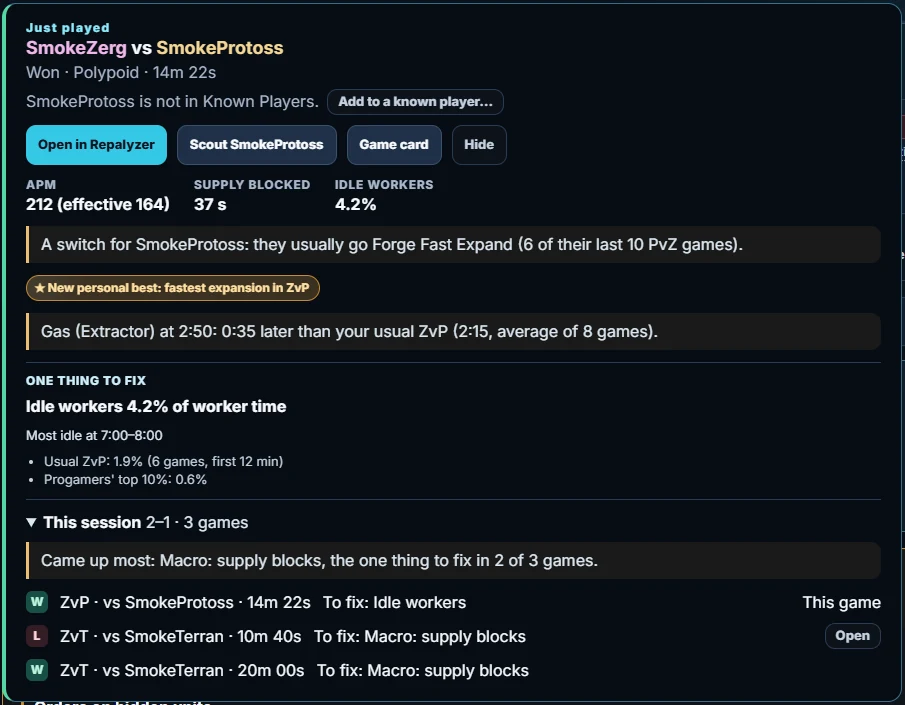
- Timings against your usual. It tells you when a key timing was far from normal, for example "Gas (Extractor) at 2:50: 0:35 later than your usual ZvP". A late gas you never notice in the moment becomes visible right away.
- This session. After two or more games in a row, it shows your record so far, each game with its one thing to fix, and the problem that came up most. If you keep losing to the same thing tonight, you see it before game five, not the next morning.
- Scout opens your dashboard on the opponent: your record against them, how predictable they are, and their builds. Useful when the same player keeps coming back on the ladder. The same button sits on your opponent's card when you open the game in Repalyzer.
- Add to a known player… When an opponent's name is not in Known Players, you can add it as another name of a player you already know. Similar players are suggested. Their games under every name then count together, so smurfs and renamed accounts no longer split your scouting.
Results you can trust, and fix
Repalyzer now decides who won more accurately: only about 0.8% of replays get the wrong winner. When it is still wrong, click the Win/Loss badge to make the other player the winner. Replays with no result at all get a Set as winner button. Your win rates and your Patterns are only as good as these results, so this matters more than it looks.
Compare skill shapes
The Game card has a Skill shape picker with three choices: Me, The opponent, and Compare. Compare draws both shapes over each other, each in its player's race colour. Put yourself next to the player who just beat you and see exactly where they were better. Or open a pro game and compare two progamers' shapes.
Army value over time
A new chart on the Units tab shows each player's living army as minerals plus gas. Workers, Overlords, buildings and units still in production do not count. Move over the chart to see both armies side by side, unit by unit. In a 1v1 it tells you how long each player was ahead and their biggest lead.
This answers a question every player asks after a loss: when did the game turn? Usually the army chart shows it to the minute, and you can jump there.
Your data is safe
Notes and tags are worth keeping, so Settings has a new Your data section with Back up… and Restore…. It covers your notes, tags, results you set by hand, Known Players you added or edited, "This is me" and your saved views. Restoring adds to what is there and never removes anything. Replays are matched by their content, so they are found even if you renamed them, moved them or moved to a new PC. Repalyzer also saves a copy by itself on each day you open it, and keeps the last 7.
Easier to understand
Repalyzer shows a lot of numbers, and a number only helps if you know what it means. 1.1.0 makes the explanations easier to find and easier to read.
How well each player sent the starting workers to mine. The score is out of 100%, measured against progamers at the same start position.
- Explanations, one click away. Every ⓘ is now a button. Hover it to read the explanation, or click it to keep it open while you look at the chart. Some link straight to the guide.
- Cards that say what they show. Against the Adept, Initial split and Integrity clues each start with one plain line, so you know what you are looking at before you read the numbers.
- Plainer words. On the Patterns tab, each difference between your wins and your losses is marked Strong, Moderate or Slight, so you can tell a real habit from noise.
- Tags, easier to start. With no tags yet, the Local Explorer sidebar has a Tag games… button. With nothing selected, it lights up the boxes to tick and tells you what to do next.
Smaller things that add up
- Known Players. The provided Korean and Foreigner lists are refreshed: 134 Korean and 226 foreign players. Pro packs and scouting reports group progamers' accounts correctly out of the box.
- Taskbar progress. The taskbar button shows the progress of an import or a library analysis and flashes when it is done. Start a big import and go play.
- Getting started. New users see three things to try first in Local Explorer, ticked off as they go.
- Workers & Supply shows supply blocks more accurately, and the Medics per Marine card no longer shows when no Medics were trained.
- Copy build order now includes research and upgrades.
- Sort by any column. On the dashboard's Maps and Opponents lists, click a column header to sort by it, and click again to reverse. Find your worst map or your most frequent opponent in one click.
A more accurate simulation engine
Repalyzer replays every game in its simulation engine, so a replay that drifts or crashes cannot be analyzed fully. This release fixes a batch of rare cases and works better with replays played on ShieldBattery. Replays with an uncertain history now continue on a best-effort clock instead of stopping early. In short: more of your games analyze from start to finish.
Every engine fix in 1.1.0
- A super rare drift caused by stacked units.
- Nukes were too powerful in the simulation, and a nuclear strike could target the wrong thing.
- Valkyries against Valkyries.
- A rare map-edge check stopped Dropships from unloading and crashed the simulation.
- A projectile spawned just beyond the map edge could break the simulation.
- Mind Control no longer resets a Carrier's repair state.
- A Maelstrom cast on a freshly dead unit no longer breaks the simulation, and Dark Swarm keeps its place when its target dies.
- Loading an irradiated unit into an Overlord no longer causes a drift.
- Cancelling an unfinished Nydus Canal entrance no longer causes a drift.
- Certain stale commands, or inspecting a nearby enemy building, no longer count as evidence of a desync.
A weekly routine
The new features work best together. Here is a simple loop for one week. Tick each step off as you go; this page remembers where you are.
Practice task
Take your last 10 games in your main matchup. Write one line of notes on each, tag the losses, and open What keeps coming up. Then check your predictability score in that matchup. If it says Predictable, find a second build in a pro replay, export it to sagi.gg and play it five times this week.
How to update
Download Repalyzer 1.1.0 and run the installer over your current version. Your library, settings and Known Players stay where they are, and the first launch shows what is new. If you want a copy of your data first, open Settings › Your data › Back up…. On an existing install, Known Players offers the refreshed Korean and Foreigner lists; adding them keeps your own edits.
The full list of changes is in the changelog. Questions, bugs or ideas? Find me in the Repalyzer channel on Discord.